

Give your AI agent a real Kubernetes cluster
Klastro’s MCP server connects Claude Code, Codex, claude.ai, ChatGPT and other MCP clients to your account. Your agent authors scenarios, starts and drives labs on real, isolated clusters, and reads assessment reports, with your permissions and nothing more.
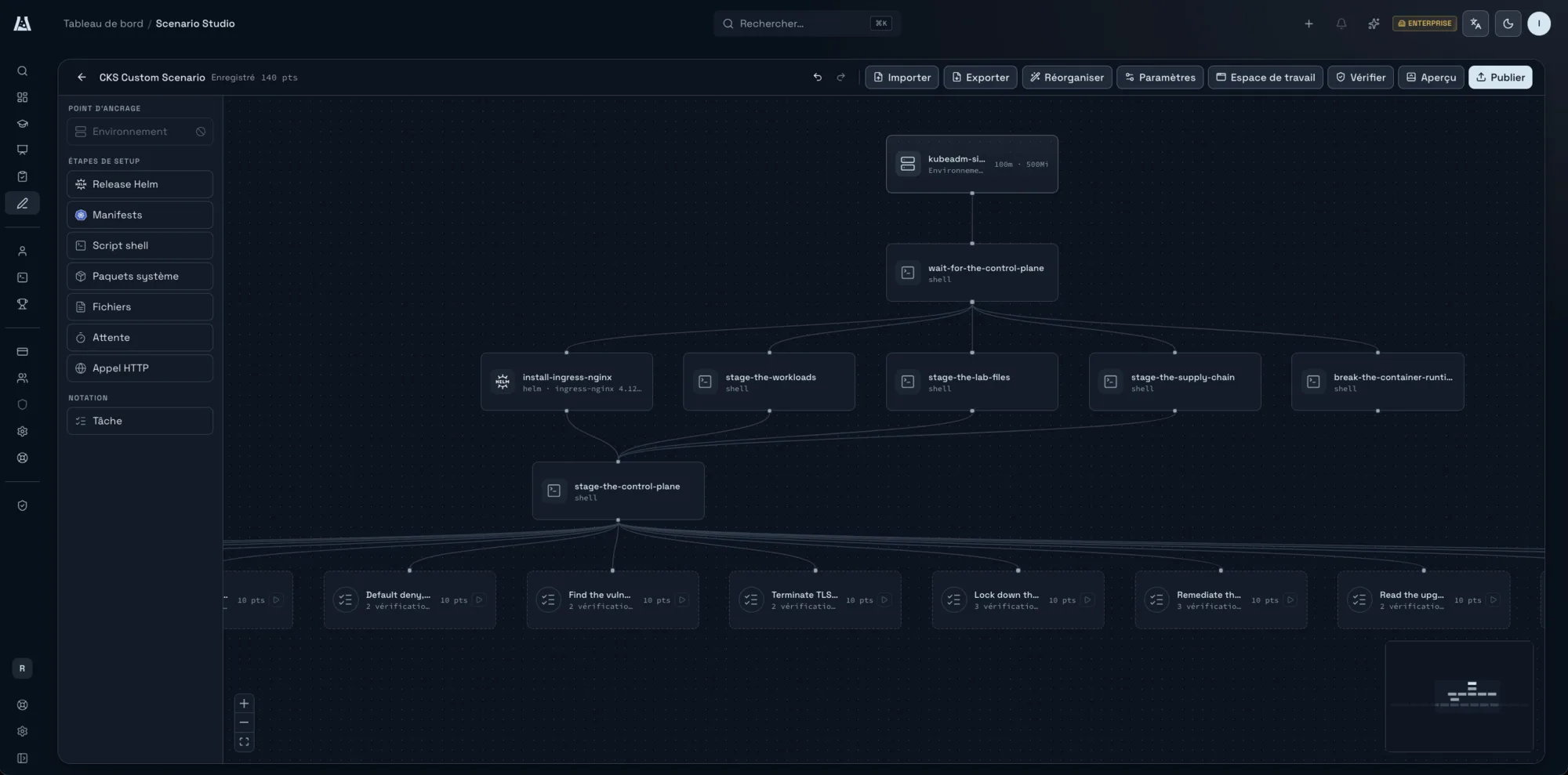
Turn our CKS prep notes into a graded challenge on kubeadm. Ten points a task.
-
klastro: list_environment_providers
kubeadm-single, own kernel, hardware-isolated
-
klastro: create_studio_draft
Draft “CKS Custom Scenario”
-
klastro: update_studio_draft_graph
1 Helm release, 6 shell scripts, 14 tasks, 140 pts
-
klastro: validate_studio_draft
No errors
-
klastro: start_studio_preview
Preview ready on kubeadm-single
-
klastro: test_task_validation
Every check fails on the untouched cluster, as it should
The draft is in Studio, unpublished. Review the canvas, then publish.
How do you connect your agent to the MCP server?
With one address, the same for every client. The server accepts any MCP client that speaks Streamable HTTP with OAuth 2.1: Claude Code, Codex, Gemini CLI, GitHub Copilot in VS Code, claude.ai, ChatGPT and the rest. You sign in through OAuth with your Klastro account, with no API key to paste.
You need a Klastro account to connect. During the public preview, accounts open by invitation.
The command for your client
# Claude Code
claude mcp add --transport http klastro https://mcp.klastro.io/mcp

# Codex
codex mcp add klastro --url https://mcp.klastro.io/mcp
codex mcp login klastro

# Gemini CLI
gemini mcp add --transport http klastro https://mcp.klastro.io/mcp

# GitHub Copilot (VS Code)
code --add-mcp '{"name":"klastro","type":"http","url":"https://mcp.klastro.io/mcp"}'
What your agent can do
The tools are generated from the platform’s API, so the agent does what the application does, under the same rules.
Author
Create a Scenario Studio draft, preview it on a real cluster and test its checks before publishing.
create_studio_draft, start_studio_preview, publish_studio_draft
Practise
Start a lab, ask for a hint, submit a task, pause and resume.
create_session, reveal_hint, submit_task_attempt
Assess
Set up an assessment, follow its status, read and export a candidate’s report.
create_assessment, get_candidate_report, export_report
Example: from CKS prep notes to a graded challenge
“Turn our CKS prep notes into a graded challenge on kubeadm. Ten points per task.”
- 01
Pick the environment
The agent lists the available environments and picks kubeadm-single: its own kernel, hardware isolation.
- 02
Write the draft
It creates the draft in Studio and fills it in: one Helm release, six setup scripts, fourteen tasks worth 140 points.
- 03
Prove the checks
It validates the draft, starts a preview on kubeadm-single and confirms every rule fails on the untouched cluster, as it should.
- 04
Leave publishing to you
The draft stays unpublished. You review the canvas in Studio, then publish.
What you can ask it
A few typical requests, and the tools the agent calls to answer them.
“Write a graded challenge on kubeadm from these notes”
The agent picks the environment, creates the draft in Studio, writes the setup steps and the tasks, then tests every check on a preview before handing back to you.
list_environment_providers, create_studio_draft, start_studio_preview, test_task_validation
“Start the Static Pods scenario and help me if I get stuck”
The agent starts the session, lets you work, reveals a hint when you ask for one, then submits the task to have it graded on the cluster’s state.
create_session, reveal_hint, submit_task_attempt
“Summarise the last candidate’s report”
The agent reads the report, picks out the tasks passed and failed, and exports it for the rest of the panel. The score is still the validation rules’.
get_candidate_report, export_report
Stay in control of access
Every client you authorise shows in your profile, under Connected applications, with the date it was authorised, the organization it acts in and its permissions, read or write. You revoke it in one click, and the agent loses access to your account.
For a script or a CI pipeline, without an agent, the profile also offers API clients: client_credentials identifiers that act in your name, in one organization, for as long as you remain a member.
In your profile
- The list of authorised MCP clients
- Their permissions: read, write
- Revocation, client by client
- API clients for your scripts and CI
A disposable cluster rather than your own kubeconfig
An agent that experiments needs somewhere to be wrong without consequences. Every Klastro session runs on a dedicated cluster in its own network space, and is destroyed at the end. The agent can break a control plane or delete a namespace, and none of it reaches your infrastructure.
What stays out of reach
- The agent acts with the permissions of the account that connected it, and nothing more
- Billing, administration and your profile are not exposed
- An assessment’s score is the validation rules’, not the agent’s opinion
Frequently asked questions
-
Can an agent run a hiring assessment?
- Yes, with Enterprise Assessments. Your agent sets up the assessment from your scenarios, follows its status while the candidate works, then reads and exports the report. The score is still the one the validation rules produce on the cluster’s real state.
-
Which plan do I need to write scenarios?
- Scenario Studio is included in the Instructor plan and in Enterprise Assessments. A lab your agent starts draws the same credits as one started from the application.
-
Do I need an API key?
- No. You sign in through OAuth with your Klastro account, from the MCP client. There is no key to paste or rotate.
Connect your agent to Klastro
Request an invitation, then add the MCP server to your client with the command above.