

Assess Kubernetes candidates on a real cluster, not a quiz
A Klastro assessment puts the candidate in front of a real, isolated Kubernetes cluster, with ordered tasks under one global timer. At the end, validation rules read the state of the cluster and produce a per-task score that is reproducible from one candidate to the next.
What a multiple-choice test will not tell you
The usual formats measure something other than the work you are hiring for.
The quiz
It checks that a candidate recognises the right syntax among four options, not that they can diagnose a pod that will not start.
The home-made test
Slow to write and maintain, graded by hand, and hard to compare from one candidate to the next.
A real cluster
The candidate works on real infrastructure, and the result is read from the state of the cluster. That is what Klastro does.
How an assessment runs
The candidate only sees their environment. Your team sees everything else.
- 01
Choose the scenarios
From the catalogue, or written in Scenario Studio and kept private to your organization. You set their order.
- 02
Invite the candidate
They open their environment in the browser, with a terminal, an editor and the instructions, and install nothing.
- 03
They work, you supervise
One isolated cluster per session, one global timer for the whole session, and your team on live supervision. Their score is not shown to them.
- 04
Read the report
Each task’s score, visible to recruiters only and exportable for the rest of the panel.
Build your assessment template
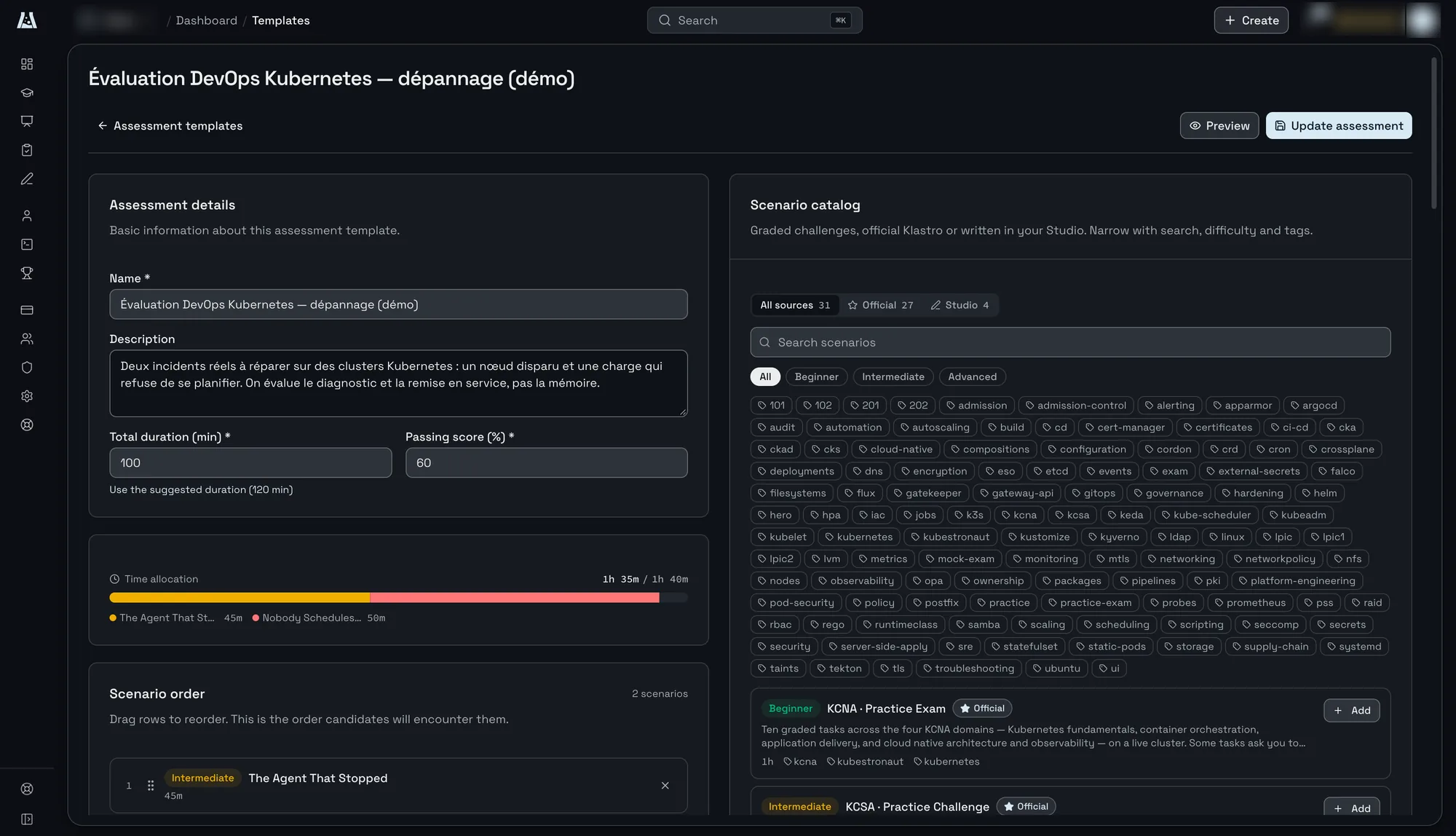
A template is prepared once and reused for every candidate for the same role.
Duration and pass mark
You set the session’s total duration and the pass score, as a percentage. Klastro suggests a duration from the scenarios you picked, which you can shorten or extend.
Total duration, pass score
Order and time
Drag the scenarios into the order the candidate will meet them. The time split between them shows as you go, scenario by scenario.
Scenario order, time split
Catalogue
Pick from Klastro’s official challenges or the ones written in your Studio, filtered by level, from beginner to advanced, and by topic: kubeadm, RBAC, NetworkPolicy, troubleshooting, security.
Official and Studio, levels and topics
A reproducible score, task by task
When the candidate submits a task, validation rules query the cluster: does the resource exist, is the deployment available, does the network policy block the expected traffic? The score depends on the result reached, not the path taken. Two candidates who reach the same state get the same score.
The candidate stays free to choose their method, as on the job: a YAML manifest or an imperative command lead to the same score if they lead to the same state. And because the report rests on the state of the cluster, it lets you justify a decision to a candidate or a manager.
What your team sees
- The session, through live supervision
- Each task’s score, hidden from the candidate
- A report for recruiters only, exportable
- The same report, readable by your AI agent through the MCP server
Scenarios from the catalogue
The demo template “DevOps Kubernetes assessment, troubleshooting” chains two real incidents. It assesses diagnosis and recovery, not memory.
The Agent That Stopped
A two-node k3s cluster came up, then one of its nodes went away, taking the workload running on it along. The candidate has to work out what happened and bring the service back.
Intermediate, 45 min, k3s
Nobody Schedules Here
A two-node kubeadm cluster refuses to place a workload on its worker. The node is up, the kubelet is running, and kubectl get nodes looks almost fine: something is still keeping every Pod away.
Advanced, 50 min, kubeadm
Your own scenarios
Written in Scenario Studio, they reproduce incidents from your own stack, with your Helm releases, manifests and scripts, and stay private to your organization.
Scenario Studio, private scenarios
From report to decision
Every finished assessment produces a report per candidate: the score in points and as a percentage, the breakdown task by task, the result against your pass mark, the session’s status, finished or timed out, and its duration. Your team reviews the report, then records its verdict.
Reports from all your assessments sit in one place, filterable by status and by template, so you can compare candidates for the same role on the same grid.
In every report
- The total score, in points and as a percentage
- The breakdown by task
- Passed or failed, against your pass mark
- Finished or timed out, and the session’s duration
- Your team’s verdict
Which roles and which environments?
Any role that runs Kubernetes: platform engineer, SRE, DevOps, cluster administrator or security specialist. Each scenario picks the environment it needs, from a lightweight vcluster to a two-node kubeadm cluster where the candidate is root.
Environments
- vcluster: a full API server per session
- k3s, on one or two nodes, each on its own isolated microVM
- kubeadm, on one or two nodes: etcd, the kubelet, certificates, a worker join
Frequently asked questions
-
Where is candidate data hosted?
- In the European Union. Session clusters, the database and backups stay in the EU, and every session has its own isolated network space, destroyed at the end.
-
How much does an assessment cost?
- Hiring assessments are part of Enterprise Assessments, sold by contract per organization. The contract sets your concurrent lab capacity, and every member can use every scenario with no seats to assign, along with Scenario Studio, SSO and private scenarios.
-
How do we start?
- Book a demo: we open an assessment scenario in front of you, show the live supervision, then the report a recruiter receives.
See an assessment on a real hiring case
An assessment scenario opened in front of you, live supervision, then the report a recruiter receives.